Pillars How it works Pricing FAQ Desktop app About
English Français Deutsch Eesti
Log in Get started free
An academic operating system
Web, desktop and browser extension, sharing one library

Your academic work is a system.
Run it like one.

Deadlines, sources, drafts, revision and the people you work with, all in one place that knows how they connect and tells you what to do next. Whether that is a semester or a thesis. AI is part of it, not the point of it.

Free to start  ·  No credit card required  ·  Licensing for a department? →
Your workspace
Learn
Research Sounding Board
Methodology flagged, 1 gap found
Write
Paper Finder → draft
3 sources saved, originality: clear
Organize
My Files, auto-updated
Every export lands here on its own
Grow
Momentum: 3 pillars this week
Cohort deadline in 4 days

The deadline you swore you'd start on earlier.

The page that's stayed blank for an hour.

The research question nobody around you really gets.

The paper you know exists somewhere, if only you could find it.

That's the actual list we designed against, not a features spec. Here's what came out of it.

One ordinary week

You do the work. It keeps up.

Not four days of using an app. Four days of doing what you were going to do anyway, while the product watches and keeps the rest of your work in step.

Tuesday
You sit a mock exam.

You miss four questions. Nobody types anything.

The four ideas behind those questions are now on the record. Cards to practise them are waiting for you, already written. You did not make a note, and you did not have to admit anything to anyone.

Exam Simulator 4 ideas you missed Flashcards
Wednesday
You ask for a study plan.

It is built around Tuesday.

You never mentioned the exam. The plan is weighted towards the four ideas you missed anyway, because the product had already seen them. You are not asked to diagnose yourself before you can be helped.

Exam Simulator what you keep missing Study Plan
Thursday
You open your work.

Your essay tells you it is in trouble, and why.

Not a red dot. A sentence: this essay is due Friday and depends on four ideas, and you have never once practised the fourth. That is your real review history read against a real deadline. Nothing that only sees your last message can say it.

Flashcards how well you hold each idea Your Work
Friday
You save the draft.

One action. Three things follow.

The essay moves to drafted, your calendar changes, and the group you promised it to sees your part is done. You did not report any of that, because there is nowhere to report it.

Writing Studio a draft now exists Your Work + Planner + Your group
Four days. Not one status update. Everything above happened because the product was paying attention, not because someone remembered to tell it.
The four pillars

Everything organized around how you actually study

No bolted-on features. Every tool in Myfolder Space fits into one of four pillars that map to real academic work, not a random grab-bag of widgets.

Learn

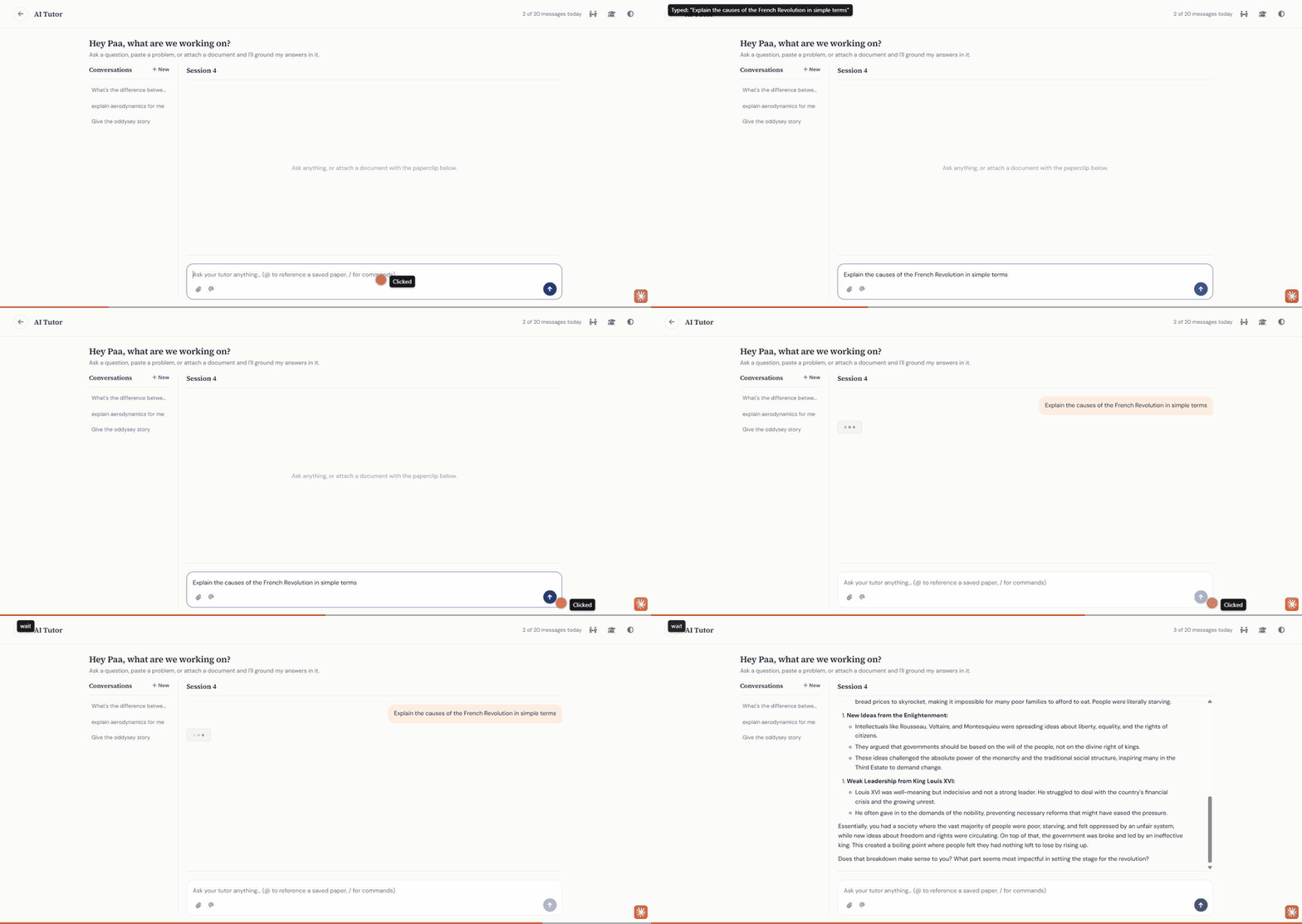
That sinking feeling when you've read the chapter twice and it still hasn't landed, or handed in a methodology section you're not sure holds up. Learn covers both: tutoring and practice for coursework, and an honest second opinion for research, not just answers either way.

  • An AI Tutor that explains it a different way until it clicks, plus an AI Solver for step-by-step problem sets
  • A Research Sounding Board that pressure-tests your question and methodology like a skeptical peer reviewer, not a yes-man
  • Paper Breakdown to turn a dense study into a plain-language summary in minutes
  • Study plans built around your real deadlines, self-paced Learn Mode courses, and an Exam Simulator that explains why an answer was wrong
  • A searchable bank of real past exam questions, with points-based access baked in
Learn

Write

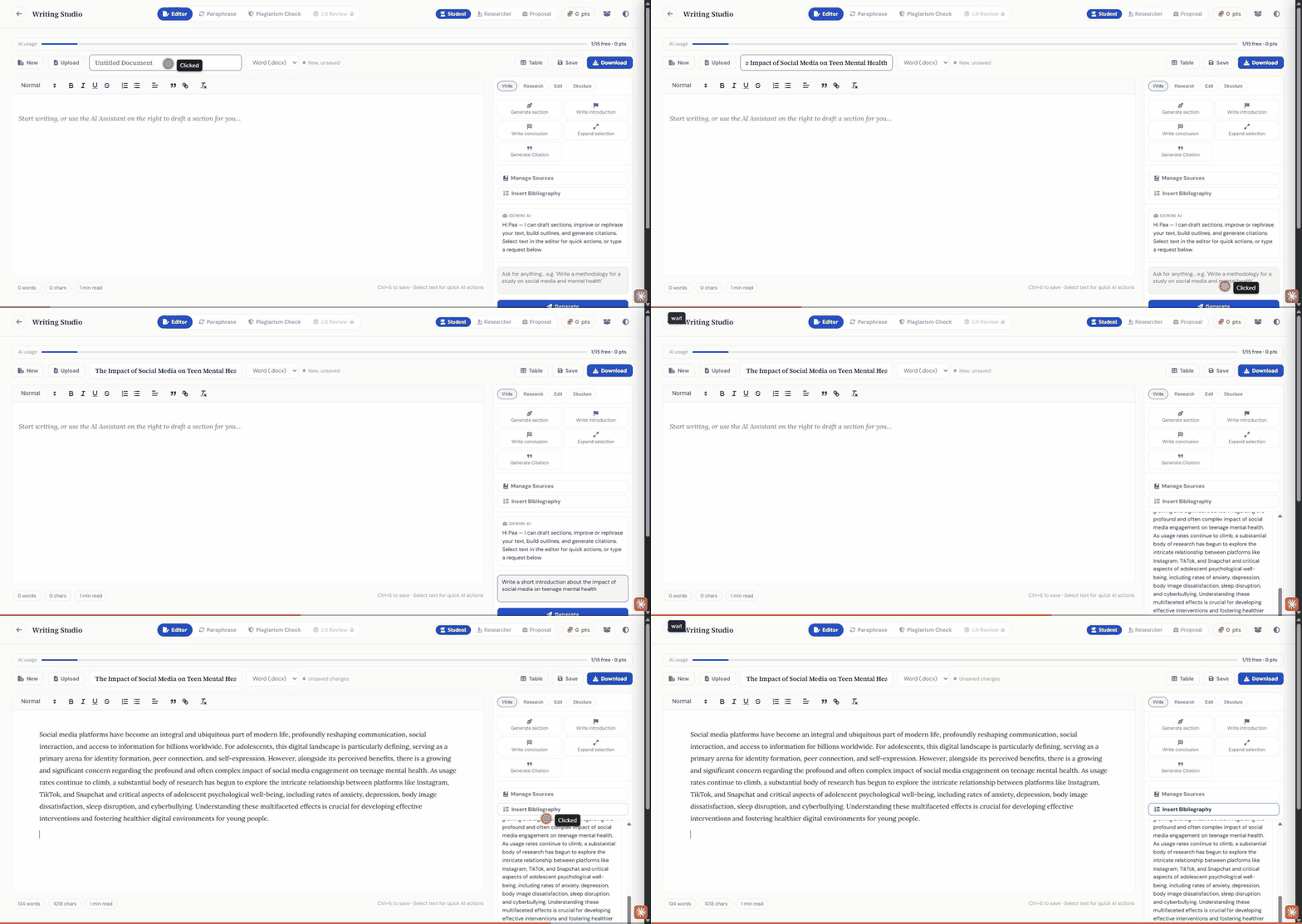
The blank page doesn't care how good your ideas are, and neither does a citation you can't track down. Write handles the search for real sources, the citations, and the originality checks, so the only thing left to fight is the actual argument.

  • Paper Finder searches real, published papers and lets you save one to your files or send it straight into Paper Breakdown, no separate tab
  • Paraphrasing and citations in five formats, APA to IEEE
  • Plagiarism and originality checks before your professor or advisor ever sees it
  • Literature review synthesis for the thread across sources you've been staring at for days
  • Real-time collaboration in Writing Studio: share a draft with a classmate or your advisor, watch who's in the document with you, and leave inline comments without emailing versions back and forth
Write

Organize

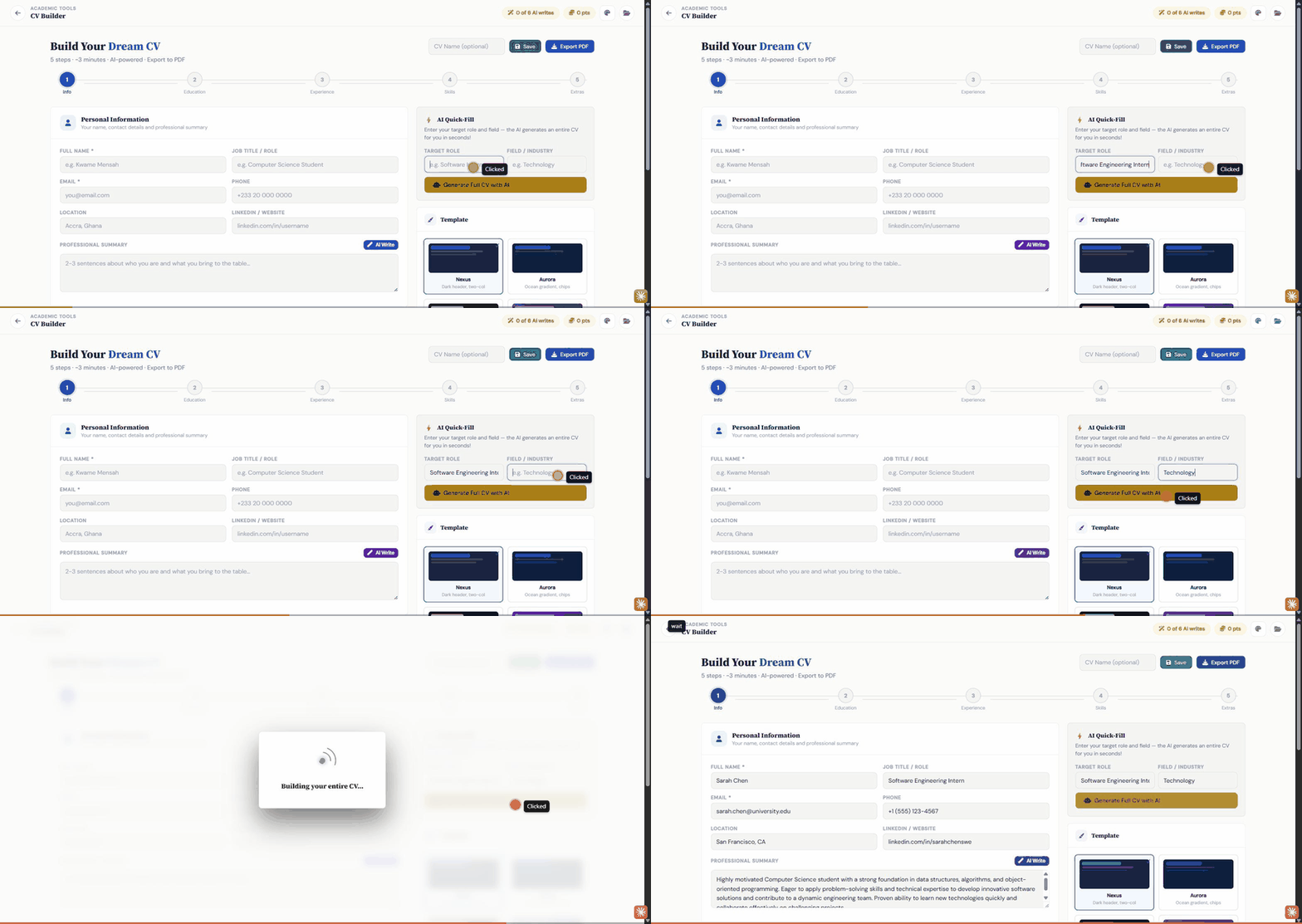
You made the plan on Sunday. By Tuesday it was gone, buried under three tabs, a downloads folder, and a notes app you forgot the password to. Organize keeps your sessions, deadlines, and files in one structure that survives contact with an actual week, and it fills itself in as you work.

  • Document Studio as one file library for everything, drafts, PDFs, and exports land there on their own, no manual saving required
  • A downloaded past exam paper or an exported CV shows up in your files automatically, the moment you download or export it
  • A calendar built around study sessions, not just due dates, with focus timers that log the time you actually put in
  • CV Builder turns your coursework and experience into a job-ready CV, saved straight to the same library
  • Share any file in your library with a classmate or your cohort, with real view/comment/edit permissions instead of just a link, and it shows up in their own library automatically
Organize

Grow

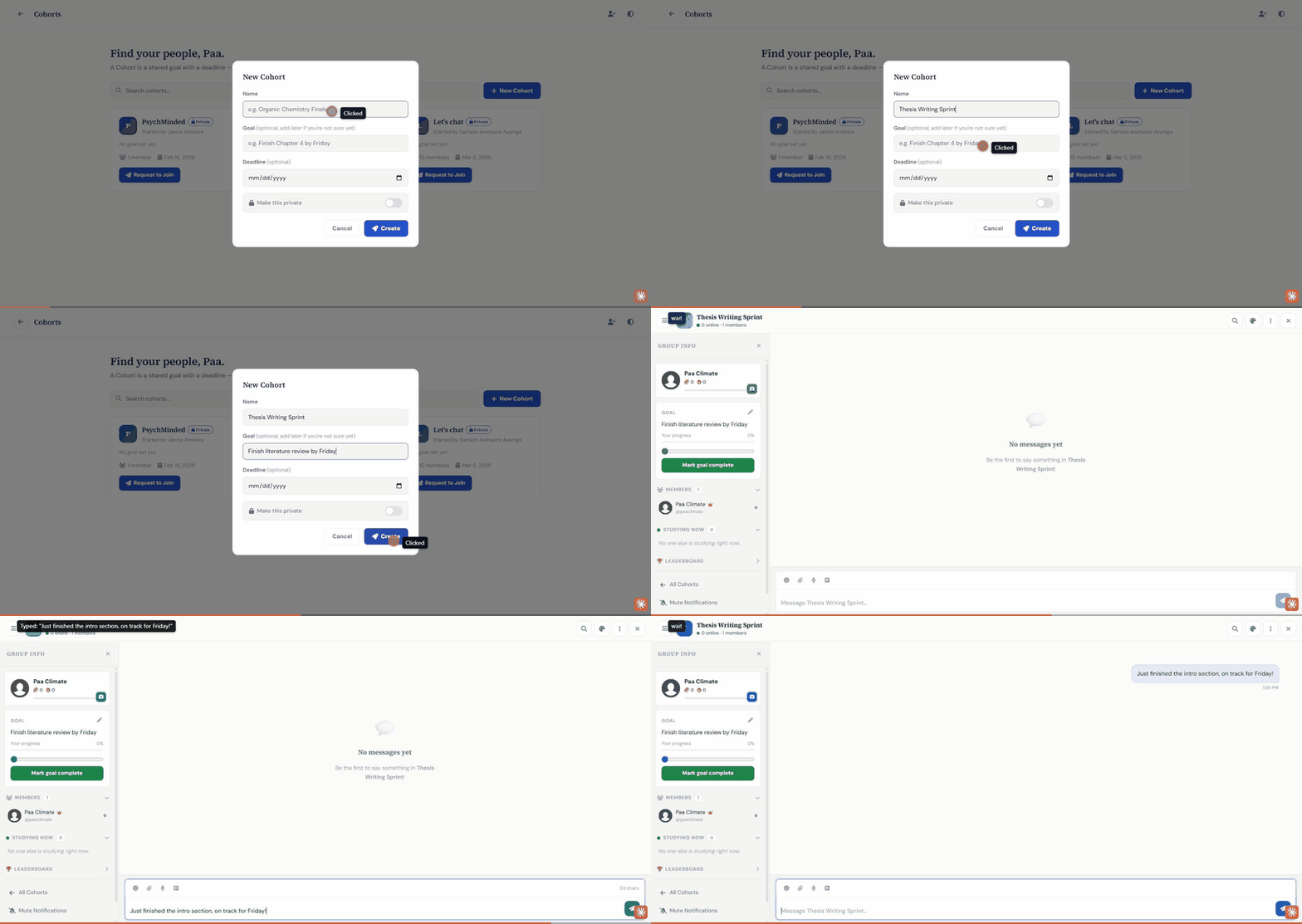
Studying and research can be quiet, lonely work. Most of the effort, nobody else ever sees. Grow makes it visible again: a real view of where your momentum is actually going, cohorts of people working through the exact same material, and a reason to invite the people you already study with.

  • Momentum: a real view across all four pillars, not a streak number or a vanity badge
  • Cohorts: small groups built around a shared goal and deadline, not just a chat room
  • Referrals that actually pay off: invite a friend and you both get a real boost to your AI usage quota
Grow
The connections

What actually passes between the parts

A question you got wrong becomes a concept on the record, without you writing anything down.

Concepts you keep missing shape the next study plan, whether or not you remember to mention them.

Your review history decides which deliverable is called at risk, and why.

Saving a draft moves that piece of work forward. There is no status button to press.

A citation you save counts as evidence the work is sourced.

Every deadline you owe shows up in your calendar, including your group's.

Submitting your part completes it for your group, on its own.

A document you upload once is readable by every tool that needs it. Never twice.

Why it's different

You didn't start this work because you loved busywork.
You started because you wanted to actually understand something.

How it works now

  • A chat window that forgets you between sessions
  • Deadlines in your head, or a planner you stopped opening in week three
  • Sources in one tab, notes in another, the draft in a third
  • Revision whenever you remember to, which is never when you need it
  • Four subscriptions that have never heard of each other

With Myfolder Space

  • One system that holds your work between sessions and across devices
  • Every deadline tracked, ranked, and surfaced before it bites
  • Sources, notes and drafts in one library that fills itself
  • Revision scheduled around what you are actually about to forget
  • One place, and it is aware of itself
The obvious question

"I already have an AI assistant."

Keep it. It is very good at answering questions, and we use models like it inside the product.

But it does not know you have a lab report due Thursday. It has not noticed you keep failing the same three concepts. It will not bring them back on the day you are about to lose them. It cannot show your supervisor the draft, share a deadline with your cohort, or put the paper you downloaded into your files. And it forgets you between sessions.

That is not a gap in the model. It is a different kind of software.

Who's actually on here

Real workloads, not stock photos

No fabricated reviews here, just the shape of the work people are actually using each pillar for.

A student, exam week
AI Tutor, Past Questions, Exam Simulator
A researcher, mid-thesis
Paper Finder, Sounding Board, Writing Studio
A cohort, shared deadline
Cohorts, Momentum, referrals
An admin, department rollout
Institution licensing, auto-enrollment
FAQ

Questions worth answering upfront

No. The Free plan is free to start, no card required. You can upgrade later from Settings whenever you actually need more.

No. Researchers get a skeptical Research Sounding Board, Paper Finder, and Writing Studio built for thesis-level work, and institutions can license Myfolder Space for a whole department with admin controls and auto-enrollment.

Yes, sign in or sign up with Google in one click from the login page, no separate password to remember.

Reach out through the contact form on the Pricing page with your institution size and needs, and we'll set up a custom licence and admin dashboard for your department.

Your next study session could start now.

Free to start, no credit card required.

Create your free account